New features
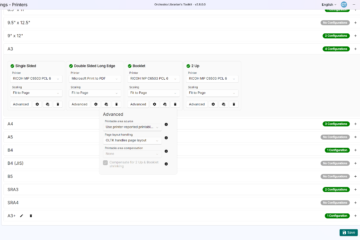
- Re-design of the Print Configurations UI to make it more user-friendly.
- Adds validation to print configurations along with improved UX.
- Adds the ability to specify a different printer for each print type. e.g. it is now possible to route A3 2-ups to one printer and A4 single pages to a second printer.
- Adds the ability to print a test print for each configuration.
- Adds the ability to choose to print Fit to page, Original size or Shrink oversized pages for each print configuration.
Bug fixes
- Fixes an issue where the number of copies, paper size, first desk number, and last desk number would get reset when navigating to a different tab and back to the printing tab.
- Fixes an issue where paper size would get reset when navigating to a different tab and back to the print default settings tab.
- Fixes an issue where the Section would not be recalled correctly to the UI when editing an instrument.
- Fixes an issue where OLTK could crash on startup if the Microsoft Account’s display name was returned as an empty string.
- Fixes an issue where editing a quick instrumentation button would not work correctly when the table row was selected.